Power analysis based on a fitted scDesignPop marginal model
Chris Dong
Department of Statistics and Data Science, University of California, Los Angelescycd@g.ucla.edu
Yihui Cen
Department of Computational Medicine, University of California, Los Angelesyihuicen@g.ucla.edu
23 January 2026
Source:vignettes/scDesignPop-power-analysis-fitted.Rmd
scDesignPop-power-analysis-fitted.RmdIntroduction
scDesignPop provides power analysis tools at cell-type-specific level. Since fitted marginal models can be obtained by users already for generating synthetic datasets, the tutorial here is about how to conduct the power analysis on the basis of the marginal model files.
Library and data preparation
Here, we load the pre-saved marginal_list object to
obtain the fitted marginal model of gene ENSG00000163221 (S100A12) for
simplicity.
library(scDesignPop)
library(SingleCellExperiment)

data("marginal_list_sel")
summary(marginal_list_sel$ENSG00000163221$fit)
#>  Family: nbinom2  ( log )
#> Formula:
#> response ~ (1 | indiv) + cell_type + `1:153337943` + `1:153337943`:cell_type
#> Data: res_list[["dmat_df"]]
#>
#>       AIC       BIC    logLik -2*log(L)  df.resid
#>   11088.7   11158.3   -5534.4   11068.7      7801
#>
#> Random effects:
#>
#> Conditional model:
#>  Groups Name        Variance Std.Dev.
#>  indiv  (Intercept) 0.08141  0.2853
#> Number of obs: 7811, groups:  indiv, 40
#>
#> Dispersion parameter for nbinom2 family (): 1.15
#>
#> Conditional model:
#>                               Estimate Std. Error z value Pr(>|z|)
#> (Intercept)                    1.80392    0.07763  23.237   <2e-16 ***
#> cell_typemononc               -4.65391    0.22215 -20.949   <2e-16 ***
#> cell_typebmem                 -5.96487    0.31401 -18.996   <2e-16 ***
#> cell_typecd4nc                -6.44683    0.22816 -28.256   <2e-16 ***
#> `1:153337943`                 -0.02273    0.08603  -0.264    0.792
#> cell_typemononc:`1:153337943` -0.15160    0.27980  -0.542    0.588
#> cell_typebmem:`1:153337943`   -0.55004    0.39328  -1.399    0.162
#> cell_typecd4nc:`1:153337943`  -0.16812    0.29164  -0.576    0.564
#> ---
#> Signif. codes:  0 '***' 0.001 '**' 0.01 '*' 0.05 '.' 0.1 ' ' 1
Performing power analysis
Given fitted marginal model, scDesignPop can perform simulation-based
power analysis for a specific gene-SNP pair across selected cell types
using the runPowerAnalysis function. Based on the previous
naming of covariates, we specify the fitted snpid as
"1:153337943", the name of the column for fixed cell state
effect and random individual effect as "cell_type" and
"indiv" in the input parameters. To check these namings, we
can call the covariate data frame using
marginal_list_sel[["ENSG00000163221"]]$fit$frame. The
selected cell types for testing are specified in cellstate_vector and
have to be consistent with the covariate data frame.
Particarly, parameters snp_number and
gene_number are used to account for multiple testing
correction with Bonferroni correction. Parameter methods is
used to specify the marginal eQTL model from
c("nb", "poisson", "gaussian", "pseudoBulkLinear").
Parameter nindivs and ncells are used to
specify the number of individuals and number of cells per individual,
from which we can analyze the performance of power analysis and find the
optimal setting. Here, we set power_nsim = 1000 to increase
the number of simulations so we can calculate power with a higher
resolution. Using power_nsim = 100 in default or smaller
values can reduce the computation time cost.
set.seed(123)
power_data <- runPowerAnalysis(marginal_list = marginal_list_sel,
                               marginal_model = "nb",
                               geneid = "ENSG00000163221",
                               snpid = "1:153337943",
                               celltype_colname = "cell_type",
                               celltype_vector = c("bmem", "monoc"),
                               indiv_colname = "indiv",
                               methods = c("poisson","pseudoBulkLinear"),
                               nindivs = c(50, 200),
                               ncells = c(10, 50),
                               alpha = 0.05,
                               power_nsim = 1000,
                               snp_number = 10,
                               gene_number = 800,
                               CI_nsim = 1000,
                               CI_conf = 0.05,
                               ncores = 25)
#> [1] -4.160949
#> [1] -0.5727631
#> [1] 1.803924
#> [1] -0.02272728
#> [1] -4.160949
#> [1] -0.5727631
#> [1] 1.803924
#> [1] -0.02272728
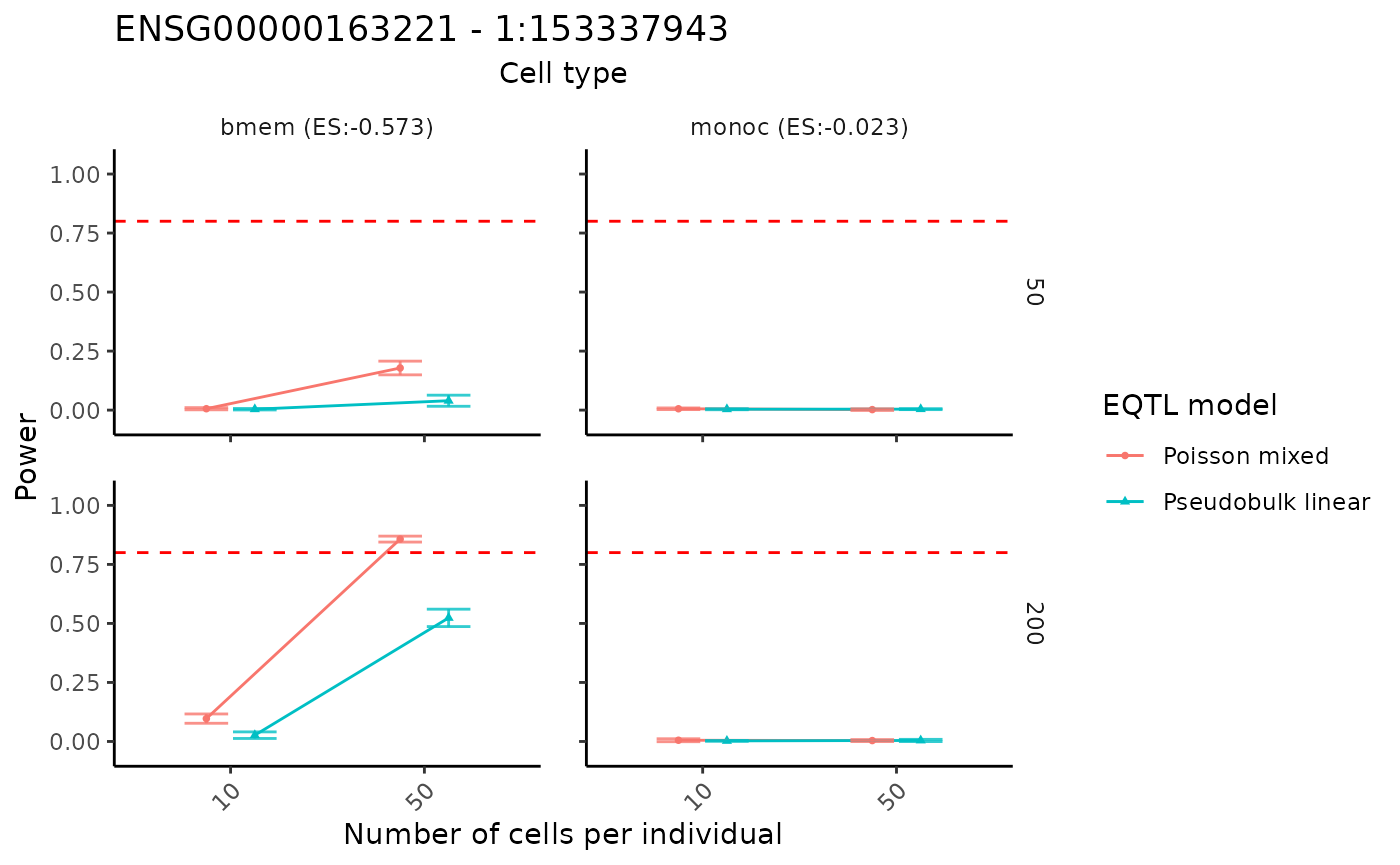
Visualization of power results
The power analysis results can be visualized using the
visualizePowerCurve function. The cell type names in the
cellstate_vector must be included in the above power
analysis.
visualizePowerCurve(power_result = power_data,
                    celltype_vector = c("bmem", "monoc"),
                    x_axis = "nindiv",
                    y_facet = "ncell",
                    col_group = "method",
                    geneid = "ENSG00000163221",
                    snpid = "1:153337943")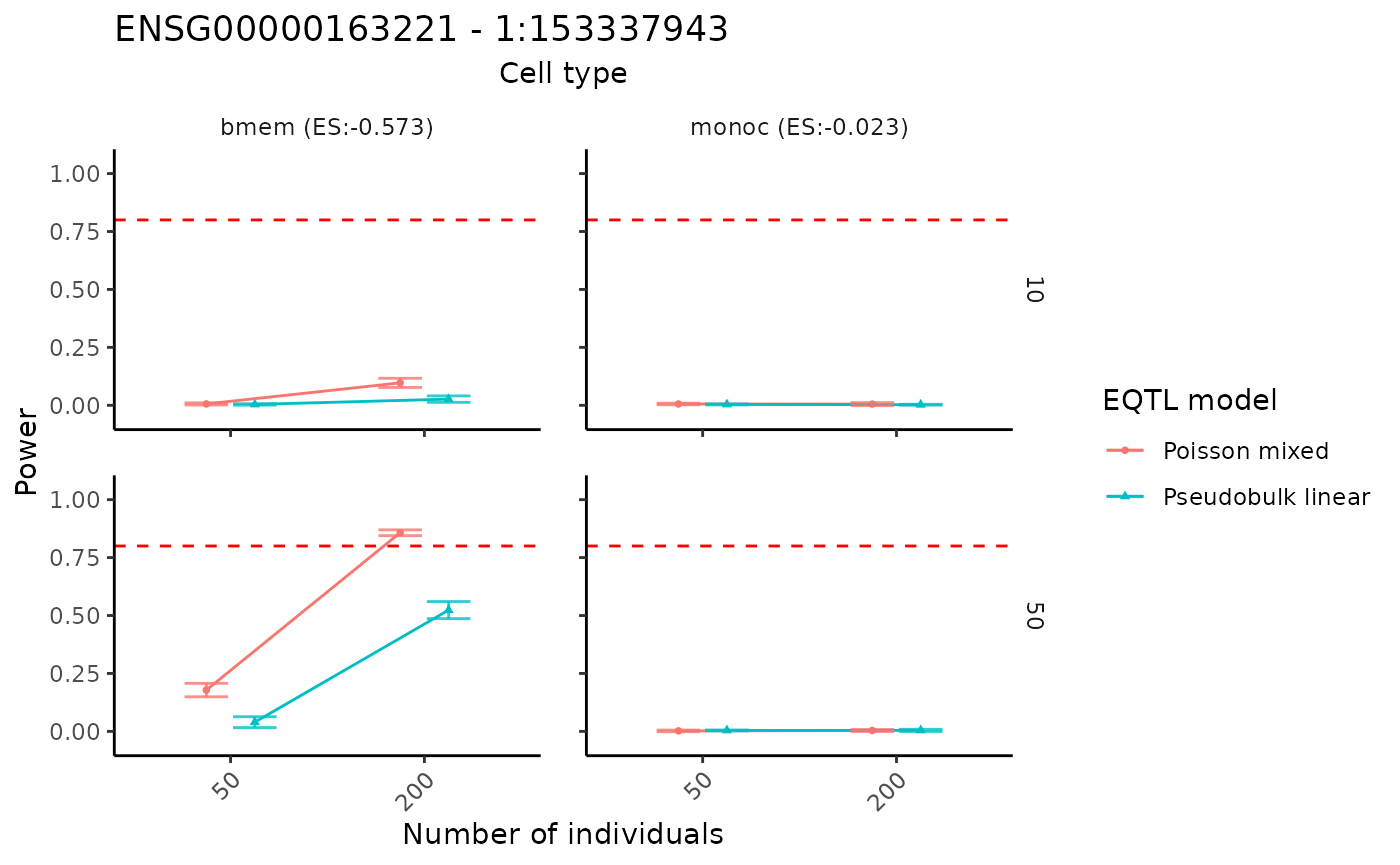
By swaping the x and y axis, we can show the result in a different way.
visualizePowerCurve(power_result = power_data,
                    celltype_vector = c("bmem", "monoc"),
                    x_axis = "ncell",
                    y_facet = "nindiv",
                    col_group = "method",
                    geneid = "ENSG00000163221",
                    snpid = "1:153337943")